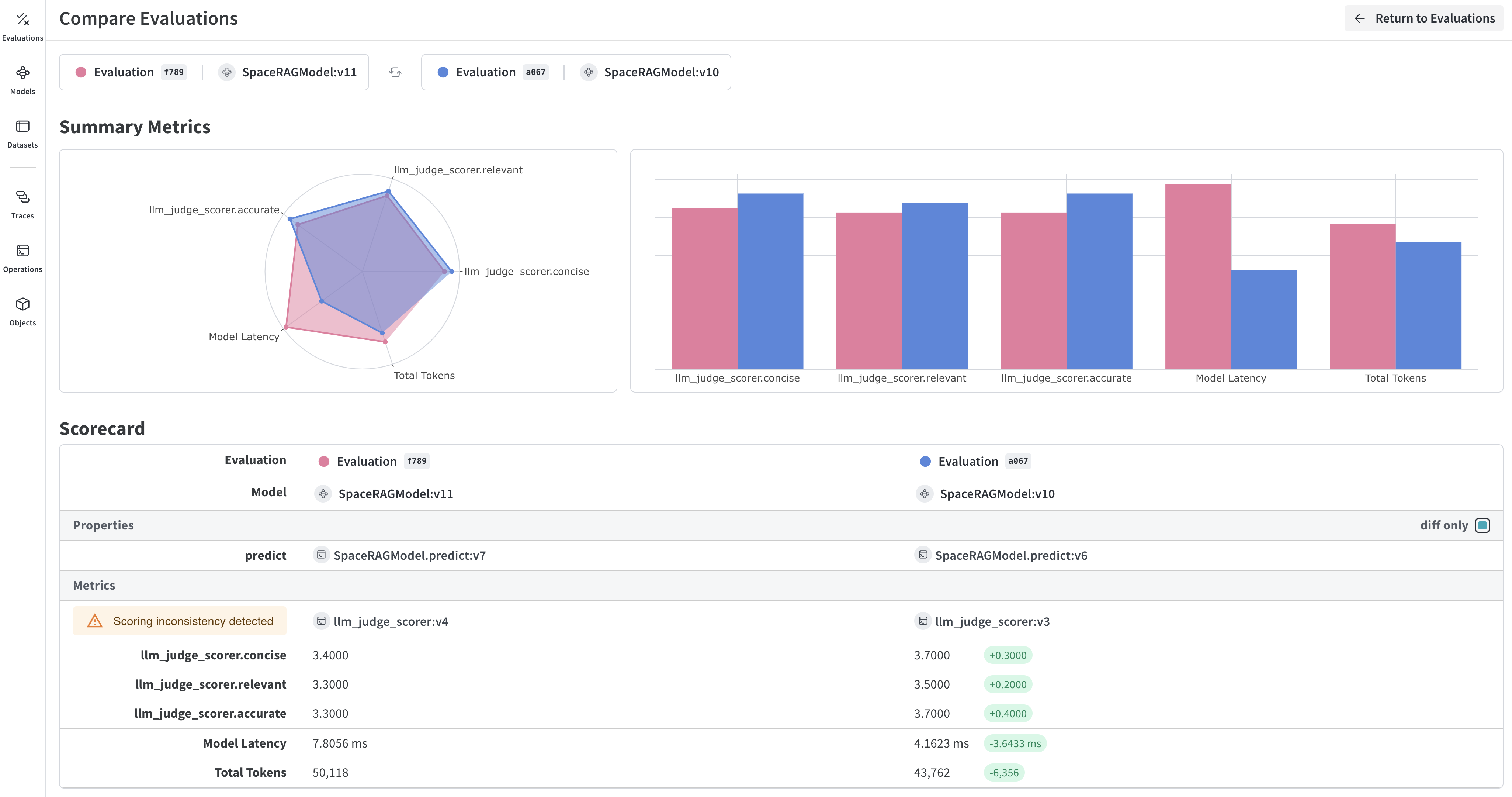
Evaluations (評価)は、アプリケーションに変更を加えた後、一連の例題に対してテストを行うことで、反復的な改善を可能にします。 Weave は、 Model クラスと Evaluation クラスを使用して、評価のトラッキングを第一級の機能としてサポートしています。これらの API は最小限の前提で設計されており、幅広いユースケースに対して柔軟に対応できます。
# チーム名とプロジェクト名を設定しますweave.init('<team-name>/eval_pipeline_quickstart')model = ExtractFruitsModel( model_name='gpt-3.5-turbo-1106', prompt_template='Extract fields ("fruit": <str>, "color": <str>, "flavor": <str>) from the following text, as json: {sentence}')sentence = "There are many fruits that were found on the recently discovered planet Goocrux. There are neoskizzles that grow there, which are purple and taste like candy."print(asyncio.run(model.predict(sentence)))# Jupyter Notebook の場合は、以下を実行してください:# await model.predict(sentence)
不正なコードを報告
コピー
AIに質問
await weave.init('eval_pipeline_quickstart');const sentence = "There are many fruits that were found on the recently discovered planet Goocrux. There are neoskizzles that grow there, which are purple and taste like candy.";const result = await model({ datasetRow: { sentence } });console.log(result);
sentences = ["There are many fruits that were found on the recently discovered planet Goocrux. There are neoskizzles that grow there, which are purple and taste like candy.","Pounits are a bright green color and are more savory than sweet.","Finally, there are fruits called glowls, which have a very sour and bitter taste which is acidic and caustic, and a pale orange tinge to them."]labels = [ {'fruit': 'neoskizzles', 'color': 'purple', 'flavor': 'candy'}, {'fruit': 'pounits', 'color': 'bright green', 'flavor': 'savory'}, {'fruit': 'glowls', 'color': 'pale orange', 'flavor': 'sour and bitter'}]examples = [ {'id': '0', 'sentence': sentences[0], 'target': labels[0]}, {'id': '1', 'sentence': sentences[1], 'target': labels[1]}, {'id': '2', 'sentence': sentences[2], 'target': labels[2]}]
不正なコードを報告
コピー
AIに質問
const sentences = [ "There are many fruits that were found on the recently discovered planet Goocrux. There are neoskizzles that grow there, which are purple and taste like candy.", "Pounits are a bright green color and are more savory than sweet.", "Finally, there are fruits called glowls, which have a very sour and bitter taste which is acidic and caustic, and a pale orange tinge to them."];const labels = [ { fruit: 'neoskizzles', color: 'purple', flavor: 'candy' }, { fruit: 'pounits', color: 'bright green', flavor: 'savory' }, { fruit: 'glowls', color: 'pale orange', flavor: 'sour and bitter' }];const examples = sentences.map((sentence, i) => ({ id: i.toString(), sentence, target: labels[i]}));
import jsonimport asyncioimport openaiimport weavefrom weave.scorers import MultiTaskBinaryClassificationF1# Weave を一度初期化しますweave.init('eval_pipeline_quickstart')# 1. Model の定義class ExtractFruitsModel(weave.Model): model_name: str prompt_template: str @weave.op() async def predict(self, sentence: str) -> dict: client = openai.AsyncClient() response = await client.chat.completions.create( model=self.model_name, messages=[{"role": "user", "content": self.prompt_template.format(sentence=sentence)}], ) result = response.choices[0].message.content if result is None: raise ValueError("No response from model") return json.loads(result)# 2. モデルのインスタンス化model = ExtractFruitsModel( model_name='gpt-3.5-turbo-1106', prompt_template='Extract fields ("fruit": <str>, "color": <str>, "flavor": <str>) from the following text, as json: {sentence}')# 3. データセットの作成sentences = ["There are many fruits that were found on the recently discovered planet Goocrux. There are neoskizzles that grow there, which are purple and taste like candy.","Pounits are a bright green color and are more savory than sweet.","Finally, there are fruits called glowls, which have a very sour and bitter taste which is acidic and caustic, and a pale orange tinge to them."]labels = [ {'fruit': 'neoskizzles', 'color': 'purple', 'flavor': 'candy'}, {'fruit': 'pounits', 'color': 'bright green', 'flavor': 'savory'}, {'fruit': 'glowls', 'color': 'pale orange', 'flavor': 'sour and bitter'}]examples = [ {'id': '0', 'sentence': sentences[0], 'target': labels[0]}, {'id': '1', 'sentence': sentences[1], 'target': labels[1]}, {'id': '2', 'sentence': sentences[2], 'target': labels[2]}]dataset = weave.Dataset(name='fruits', rows=examples)weave.publish(dataset)# 4. スコアリング関数の定義@weave.op()def fruit_name_score(target: dict, output: dict) -> dict: return {'correct': target['fruit'] == output['fruit']}# 5. 評価の実行evaluation = weave.Evaluation( name='fruit_eval', dataset=dataset, scorers=[ MultiTaskBinaryClassificationF1(class_names=["fruit", "color", "flavor"]), fruit_name_score ],)print(asyncio.run(evaluation.evaluate(model)))
不正なコードを報告
コピー
AIに質問
import * as weave from 'weave';import OpenAI from 'openai';// Weave を一度初期化しますawait weave.init('eval_pipeline_quickstart');// 1. Model の定義// 注意: weave.Model はまだ TypeScript でサポートされていません。// 代わりに、モデルのような関数を weave.op でラップしてください。const openaiClient = new OpenAI();const model = weave.op(async function myModel({datasetRow}) { const prompt = `Extract fields ("fruit": <str>, "color": <str>, "flavor": <str>) from the following text, as json: ${datasetRow.sentence}`; const response = await openaiClient.chat.completions.create({ model: 'gpt-3.5-turbo', messages: [{ role: 'user', content: prompt }], response_format: { type: 'json_object' } }); return JSON.parse(response.choices[0].message.content);});// 2. データセットの作成const sentences = [ "There are many fruits that were found on the recently discovered planet Goocrux. There are neoskizzles that grow there, which are purple and taste like candy.", "Pounits are a bright green color and are more savory than sweet.", "Finally, there are fruits called glowls, which have a very sour and bitter taste which is acidic and caustic, and a pale orange tinge to them."];const labels = [ { fruit: 'neoskizzles', color: 'purple', flavor: 'candy' }, { fruit: 'pounits', color: 'bright green', flavor: 'savory' }, { fruit: 'glowls', color: 'pale orange', flavor: 'sour and bitter' }];const examples = sentences.map((sentence, i) => ({ id: i.toString(), sentence, target: labels[i]}));const dataset = new weave.Dataset({ name: 'fruits', rows: examples});await dataset.save();// 3. スコアリング関数の定義const fruitNameScorer = weave.op( function fruitNameScore({target, output}) { return { correct: target.fruit === output.fruit }; });// 4. 評価の実行const evaluation = new weave.Evaluation({ name: 'fruit_eval', dataset: dataset, scorers: [fruitNameScorer],});const results = await evaluation.evaluate(model);console.log(results);


 Platform
 W&B Models
 W&B Weave
 W&B Inference
 W&B Training
 Release Notes