メインコンテンツへスキップ
これはインタラクティブなノートブックです。ローカルで実行するか、以下のリンクを使用してください:

サードパーティシステムからの トレース のインポート

GenAI アプリケーションのリアルタイムな トレース を取得するために、Weave のシンプルなインテグレーションを使用して Python や Javascript コードをインストルメント化することが不可能な場合があります。多くの場合、これらの トレース は後で csvjson 形式で利用可能になります。 このクックブックでは、低レベルの Weave Python API を探索し、CSV ファイルからデータを抽出して Weave にインポートし、インサイトの獲得や厳密な 評価 を推進する方法を説明します。 このクックブックで想定しているサンプル データセット の構造は以下の通りです:
conversation_id,turn_index,start_time,user_input,ground_truth,answer_text
1234,1,2024-09-04 13:05:39,This is the beginning, ['This was the beginning'], That was the beginning
1235,1,2024-09-04 13:02:11,This is another trace,, That was another trace
1235,2,2024-09-04 13:04:19,This is the next turn,, That was the next turn
1236,1,2024-09-04 13:02:10,This is a 3 turn conversation,, Woah thats a lot of turns
1236,2,2024-09-04 13:02:30,This is the second turn, ['That was definitely the second turn'], You are correct
1236,3,2024-09-04 13:02:53,This is the end,, Well good riddance!

このクックブックでのインポートに関する決定を理解するために、Weave の トレース には 1対多の継続的な親子関係があることを知っておく必要があります。つまり、1つの親が複数の子を持つことができ、その親自身が別の親の子である場合もあります。 そのため、完全な会話ログを提供するために、conversation_id を親の識別子として、turn_index を子の識別子として使用します。 必要に応じて変数を変更してください。

環境のセットアップ

必要なパッケージをすべてインストールし、インポートします。 環境変数に WANDB_API_KEY を設定することで、wandb.login() で簡単にログインできるようにします(これは Colab の secret として提供する必要があります)。 Colab にアップロードするファイル名を name_of_file に設定し、ログを記録する W&B の プロジェクト 名を name_of_wandb_project に設定します。 注意: name_of_wandb_project は、トレース をログに記録するチームを指定するために {team_name}/{project_name} の形式にすることもできます。 その後、weave.init() を呼び出して Weave クライアントを取得します。
%pip install wandb weave pandas datetime --quiet

import os

import pandas as pd
import wandb
from google.colab import userdata

import weave

## サンプルファイルをディスクに書き込みます
with open("/content/import_cookbook_data.csv", "w") as f:
    f.write(
        "conversation_id,turn_index,start_time,user_input,ground_truth,answer_text\n"
    )
    f.write(
        '1234,1,2024-09-04 13:05:39,This is the beginning, ["This was the beginning"], That was the beginning\n'
    )
    f.write(
        "1235,1,2024-09-04 13:02:11,This is another trace,, That was another trace\n"
    )
    f.write(
        "1235,2,2024-09-04 13:04:19,This is the next turn,, That was the next turn\n"
    )
    f.write(
        "1236,1,2024-09-04 13:02:10,This is a 3 turn conversation,, Woah thats a lot of turns\n"
    )
    f.write(
        '1236,2,2024-09-04 13:02:30,This is the second turn, ["That was definitely the second turn"], You are correct\n'
    )
    f.write("1236,3,2024-09-04 13:02:53,This is the end,, Well good riddance!\n")

os.environ["WANDB_API_KEY"] = userdata.get("WANDB_API_KEY")
name_of_file = "/content/import_cookbook_data.csv"
name_of_wandb_project = "import-weave-traces-cookbook"

wandb.login()

weave_client = weave.init(name_of_wandb_project)

データの読み込み

データを Pandas の DataFrame に読み込み、conversation_idturn_index でソートして、親子関係が正しく並ぶようにします。 これにより、conversation_data の下に会話のターンが配列として格納された 2 カラムの Pandas DF が作成されます。
## データを読み込み、整形します
df = pd.read_csv(name_of_file)

sorted_df = df.sort_values(["conversation_id", "turn_index"])

# 各会話に対して辞書の配列を作成する関数
def create_conversation_dict_array(group):
    return group.drop("conversation_id", axis=1).to_dict("records")

# conversation_id でデータフレームをグループ化し、集計を適用します
result_df = (
    sorted_df.groupby("conversation_id")
    .apply(create_conversation_dict_array)
    .reset_index()
)
result_df.columns = ["conversation_id", "conversation_data"]

# 集計結果の確認
result_df.head()

トレース を Weave に ログ

Pandas DF をイテレートします:
  • conversation_id ごとに親の call を作成します。
  • ターンの配列をイテレートし、turn_index でソートされた子の call を作成します。
低レベル Python API の重要な概念:
  • Weave の call は Weave の トレース と同等です。この call には親または子が関連付けられている場合があります。
  • Weave の call には、フィードバックや メタデータ など、他のものを関連付けることができます。ここでは入力と出力のみを関連付けますが、データが提供されている場合は、インポート時にこれらを追加することもできます。
  • Weave の call はリアルタイムで追跡されることを想定しているため、createdfinished があります。今回は事後インポートであるため、オブジェクトが定義され、互いに関連付けられた時点で作成し、終了させます。
  • call の op 値は、Weave が同じ構成の call をどのように分類するかを決定します。この例では、すべての親の call は Conversation タイプ、すべての子の call は Turn タイプになります。これは必要に応じて変更可能です。
  • call は inputsoutput を持つことができます。inputs は作成時に定義され、output は call が終了したときに定義されます。
# トレースを weave にログします

# 集計された会話をイテレートします
for _, row in result_df.iterrows():
    # 会話の親を定義します。
    # 先ほど定義した weave_client を使用して "call" を作成します。
    parent_call = weave_client.create_call(
        # Op 値はこれを Weave Op として登録し、将来的にグループとして簡単に取得できるようにします。
        op="Conversation",
        # 上位レベルの会話の入力を、その下のすべてのターンとして設定します。
        inputs={
            "conversation_data": row["conversation_data"][:-1]
            if len(row["conversation_data"]) > 1
            else row["conversation_data"]
        },
        # この Conversation の親は存在しないため None に設定します。
        parent=None,
        # UI上でこの特定の会話が表示される名前を設定します。
        display_name=f"conversation-{row['conversation_id']}",
    )

    # 親の出力を会話の最後のトレースに設定します。
    parent_output = row["conversation_data"][len(row["conversation_data"]) - 1]

    # 親に関連するすべての会話ターンをイテレートし、
    # 会話の子としてログに記録します。
    for item in row["conversation_data"]:
        item_id = f"{row['conversation_id']}-{item['turn_index']}"

        # ここで再度 call を作成し、会話の下に分類します。
        call = weave_client.create_call(
            # 単一の会話トレースを "Turn" として定義します。
            op="Turn",
            # RAG の 'ground_truth' を含むターンのすべての入力を提供します。
            inputs={
                "turn_index": item["turn_index"],
                "start_time": item["start_time"],
                "user_input": item["user_input"],
                "ground_truth": item["ground_truth"],
            },
            # これを先ほど定義した親の子として設定します。
            parent=parent_call,
            # Weave で識別するための名前を提供します。
            display_name=item_id,
        )

        # call の出力を回答に設定します。
        output = {
            "answer_text": item["answer_text"],
        }

        # これらはすでに発生したトレースであるため、単一ターンの call を終了させます。
        weave_client.finish_call(call=call, output=output)
    # すべての子をログに記録したので、親の call も終了させます。
    weave_client.finish_call(call=parent_call, output=parent_output)

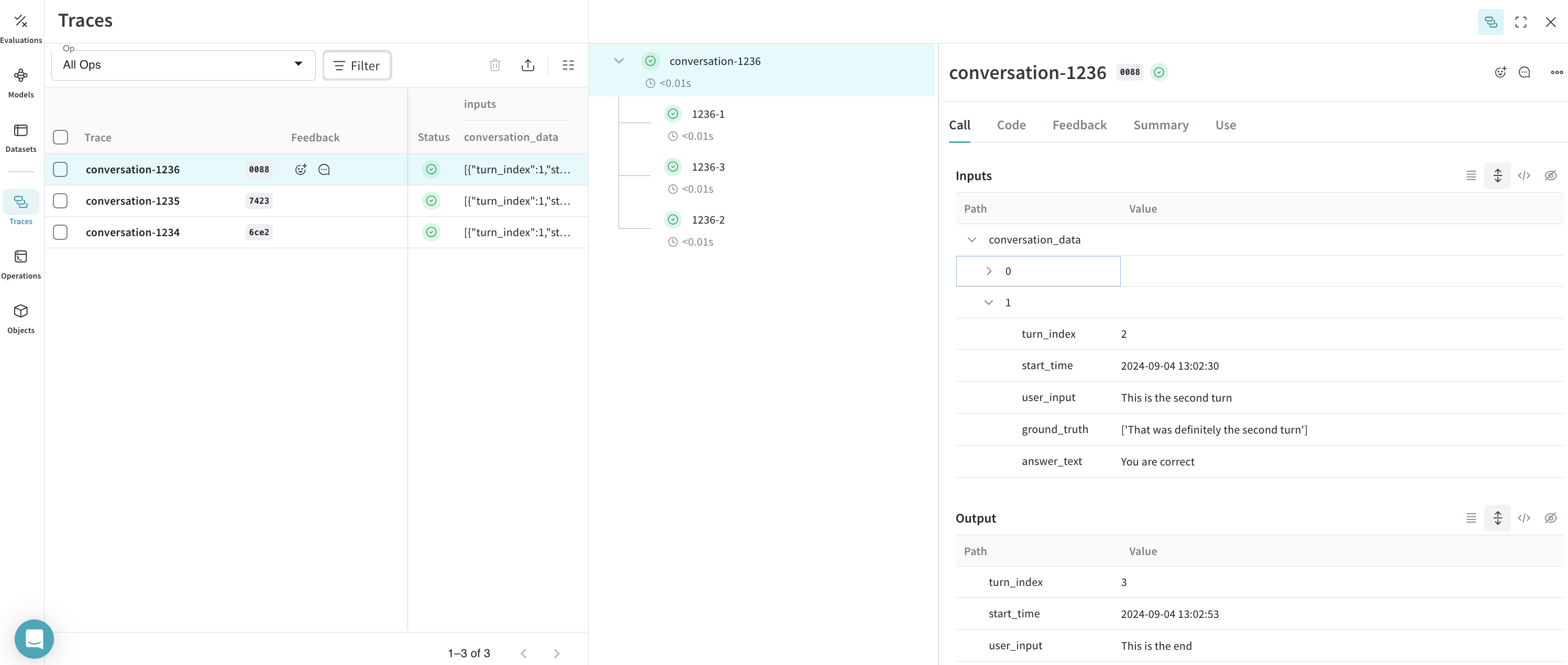
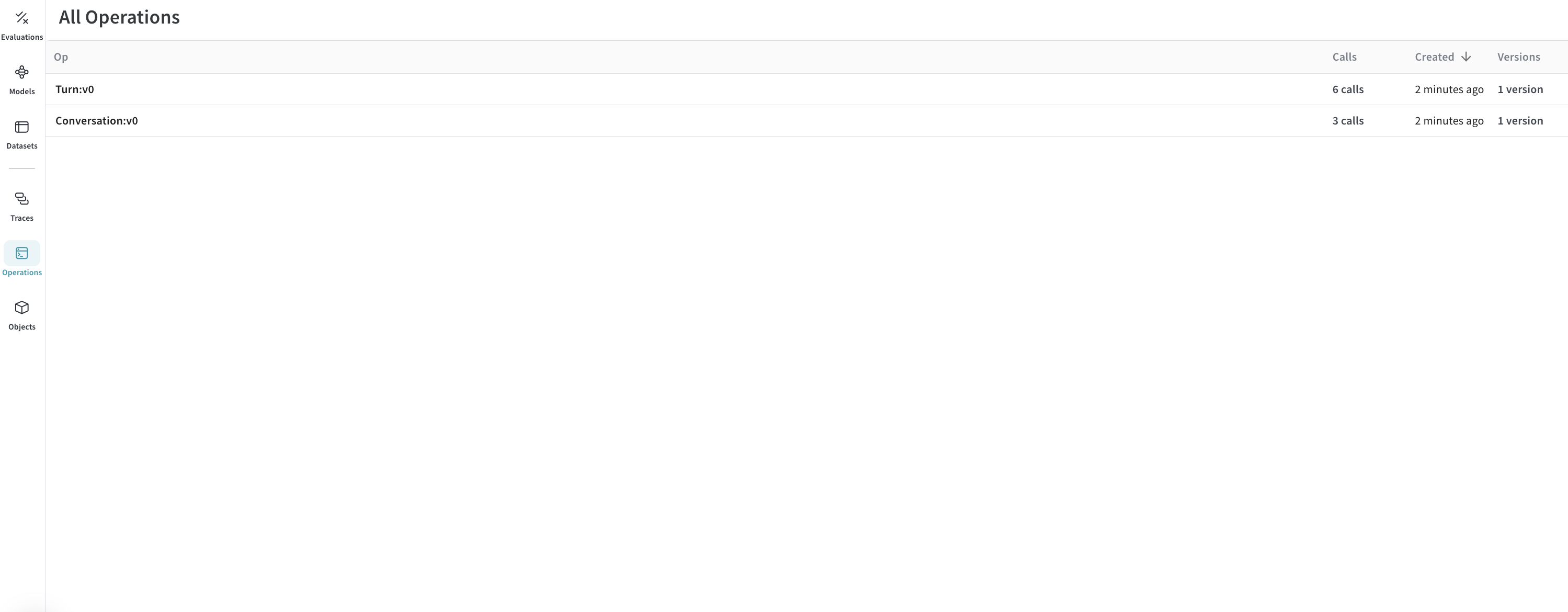
結果: トレース が Weave にログされました

トレース:
image.png
Operations:
image.png

ボーナス: トレース をエクスポートして厳密な 評価 を実行しましょう!

トレース が Weave に入り、会話の様子が把握できたら、後でそれらを別の プロセス にエクスポートして Weave 評価 を実行したくなるかもしれません。
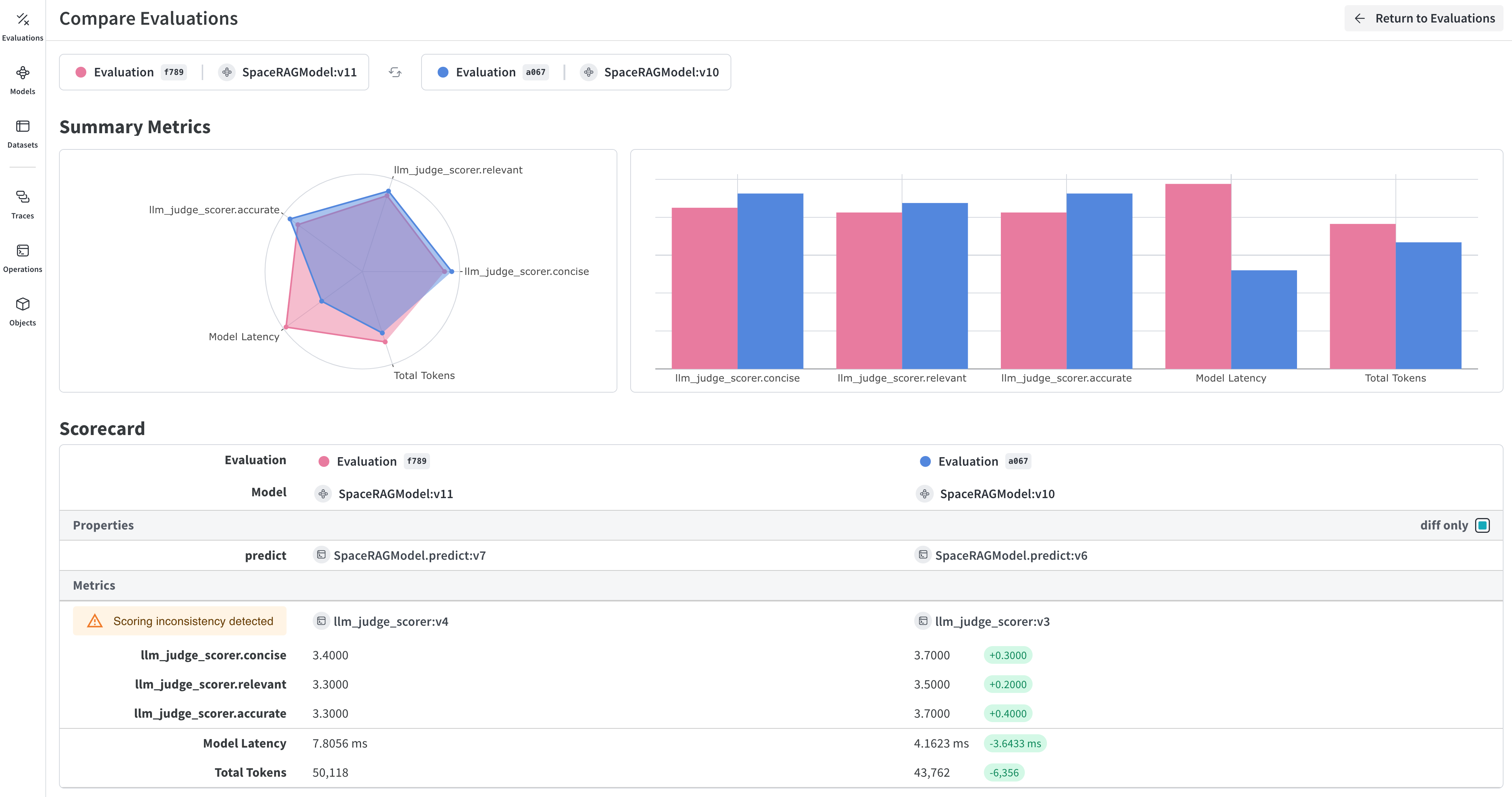
image.png
これを行うには、シンプルなクエリ API を介して W&B からすべての会話を取得し、そこから データセット を作成します。
## このセルはデフォルトでは実行されません。実行するには下の行をコメントアウトしてください。
%%script false --no-raise-error
## 評価用のすべての Conversation トレースを取得し、評価用データセットを準備します。

# すべての Conversation オブジェクトを取得するクエリフィルターを作成します。
# 下記の ref はあなたのプロジェクト固有のものです。UI のプロジェクトの Operations に移動し、
# "Conversations" オブジェクトをクリックして、サイドパネルの "Use" タブをクリックすることで取得できます。
weave_ref_for_conversation_op = "weave://wandb-smle/import-weave-traces-cookbook/op/Conversation:tzUhDyzVm5bqQsuqh5RT4axEXSosyLIYZn9zbRyenaw"
filter = weave.trace_server.trace_server_interface.CallsFilter(
    op_names=[weave_ref_for_conversation_op],
  )

# クエリを実行します
conversation_traces = weave_client.get_calls(filter=filter)

rows = []

# 会話トレースを調べて、そこからデータセットの行を構築します
for single_conv in conversation_traces:
  # この例では、RAG パイプラインを使用した会話のみに関心がある場合があるため、
  # そのようなタイプの会話をフィルタリングします。
  is_rag = False
  for single_trace in single_conv.inputs['conversation_data']:
    if single_trace['ground_truth'] is not None:
      is_rag = True
      break
  if single_conv.output['ground_truth'] is not None:
      is_rag = True

  # RAG を使用した会話であると特定されたら、それをデータセットに追加します
  if is_rag:
    inputs = []
    ground_truths = []
    answers = []

    # 会話の各ターンを調べます
    for turn in single_conv.inputs['conversation_data']:
      inputs.append(turn.get('user_input', ''))
      ground_truths.append(turn.get('ground_truth', ''))
      answers.append(turn.get('answer_text', ''))
    ## 会話が単一ターンの場合を考慮します
    if len(single_conv.inputs) != 1 or single_conv.inputs['conversation_data'][0].get('turn_index') != single_conv.output.get('turn_index'):
      inputs.append(single_conv.output.get('user_input', ''))
      ground_truths.append(single_conv.output.get('ground_truth', ''))
      answers.append(single_conv.output.get('answer_text', ''))

    data = {
        'question': inputs,
        'contexts': ground_truths,
        'answer': answers
    }

    rows.append(data)

# データセットの行が作成されたので、Dataset オブジェクトを作成し、
# 後で取得できるように Weave に公開します。
dset = weave.Dataset(name = "conv_traces_for_eval", rows=rows)
weave.publish(dset)

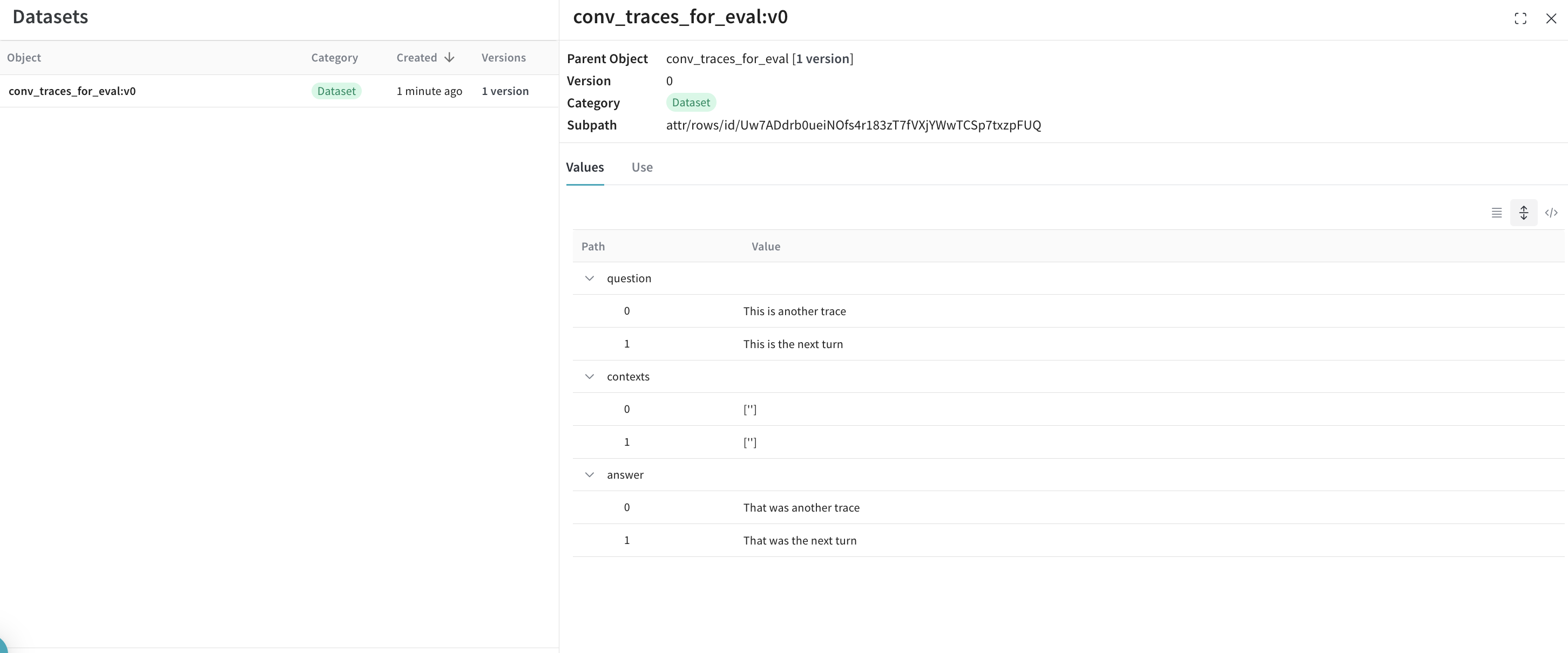
結果

image.png
評価 についての詳細については、新しく作成した データセット を使用して RAG アプリケーションを評価する クイックスタート をチェックしてください!