メインコンテンツへスキップ
W&B Registry の グローバル検索バー を使用して、registry、collection、artifact バージョンタグ、collection タグ、または エイリアス を検索できます。W&B Python SDK を使用すると、MongoDB スタイルのクエリを使用して、特定の基準に基づいて registry、collection、および artifact バージョンをフィルタリング することができます。 表示権限を持っているアイテムのみが検索結果に表示されます。

registry アイテムの検索

registry アイテムを検索するには:
  1. W&B Registry に移動します。
  2. ページ上部の検索バーに検索語を指定します。Enter キーを押して検索を実行します。
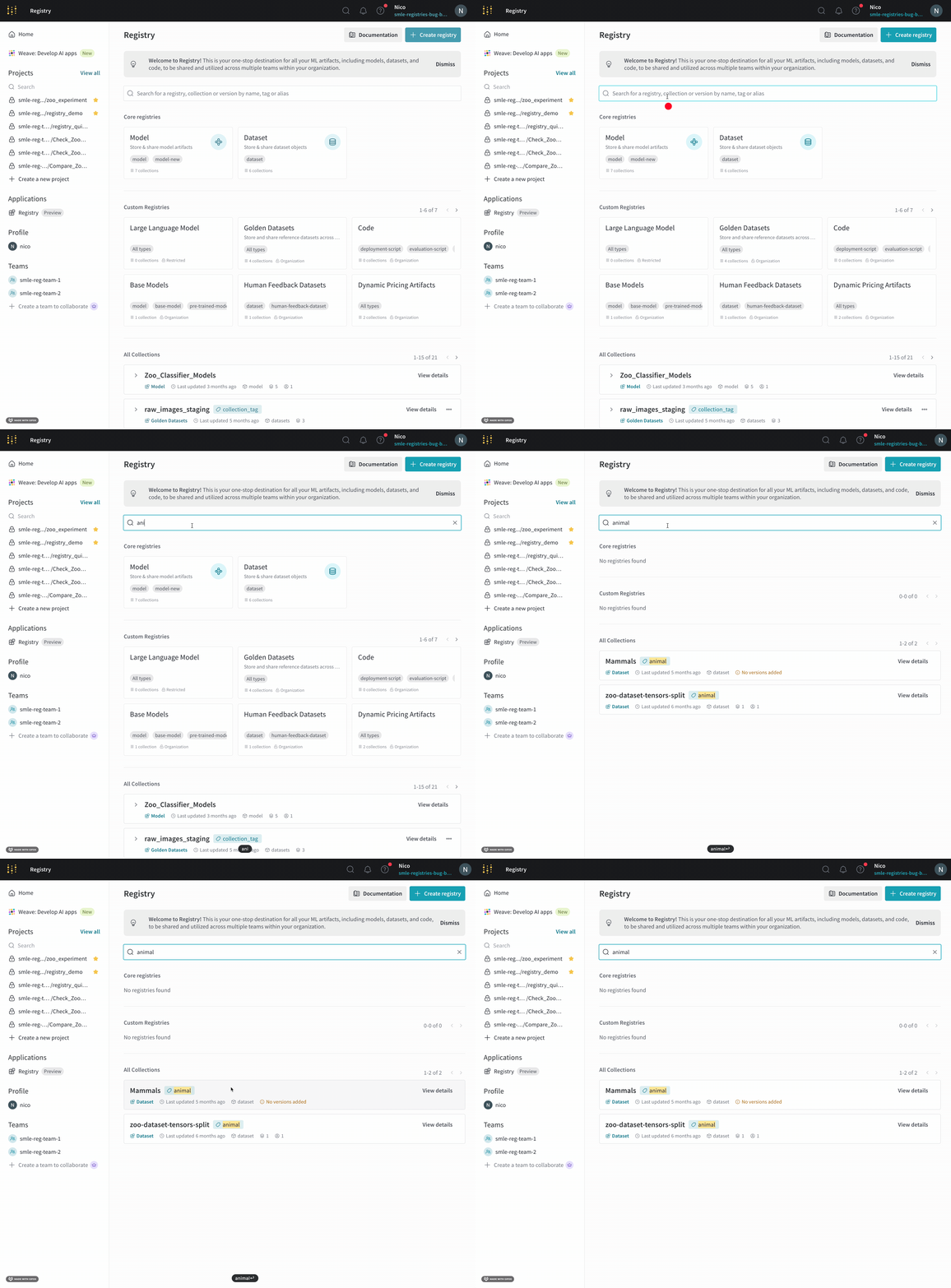
指定した用語が既存の registry、collection 名、artifact バージョンタグ、collection タグ、または エイリアス と一致する場合、検索結果が検索バーの下に表示されます。
Searching within a Registry

MongoDB スタイルのクエリによる registry アイテムのクエリ

wandb.Api().registries()クエリ述語 (query predicates) を使用して、1 つ以上の MongoDB スタイルクエリ に基づいて registry、collection、および artifact バージョンをフィルタリングします。 次の表は、フィルタリングしたいアイテムのタイプに基づいて使用できるクエリ名の一覧です。
クエリ名
registriesname, description, created_at, updated_at
collectionsname, tag, description, created_at, updated_at
versionstag, alias, created_at, updated_at, metadata
以下の コード 例は、一般的な検索シナリオを示しています。 wandb.Api().registries() メソッドを使用するには、まず W&B Python SDK (wandb) ライブラリ をインポートします。
import wandb

# (オプション) 読みやすさのために wandb.Api() クラスのインスタンスを作成します
api = wandb.Api()
文字列 model を含むすべての registry をフィルタリングする:
# 文字列 `model` を含むすべての registry をフィルタリングします
registry_filters = {
    "name": {"$regex": "model"}
}

# フィルタに一致するすべての registry のイテラブルを返します
registries = api.registries(filter=registry_filters)
registry に関係なく、collection 名に文字列 yolo を含むすべての collection をフィルタリングする:
# registry に関係なく、collection 名に 
# 文字列 `yolo` を含むすべての collection をフィルタリングします
collection_filters = {
    "name": {"$regex": "yolo"}
}

# フィルタに一致するすべての collection のイテラブルを返します
collections = api.registries().collections(filter=collection_filters)
registry に関係なく、collection 名に文字列 yolo を含み、かつ cnn タグを持つすべての collection をフィルタリングする:
# registry に関係なく、collection 名に文字列 `yolo` を含み、
# かつ `cnn` タグを持つすべての collection をフィルタリングします
collection_filters = {
    "name": {"$regex": "yolo"},
    "tag": "cnn"
}

# フィルタに一致するすべての collection のイテラブルを返します
collections = api.registries().collections(filter=collection_filters)
文字列 model を含み、かつ image-classification タグまたは latest エイリアス のいずれかを持つすべての artifact バージョンを検索する:
# 文字列 `model` を含み、かつ `image-classification` タグまたは 
# `latest` エイリアス のいずれかを持つすべての artifact バージョンを検索します
registry_filters = {
    "name": {"$regex": "model"}
}

# 論理 $or 演算子を使用して artifact バージョンをフィルタリングします
version_filters = {
    "$or": [
        {"tag": "image-classification"},
        {"alias": "production"}
    ]
}

# フィルタに一致するすべての artifact バージョンのイテラブルを返します
artifacts = api.registries(filter=registry_filters).collections().versions(filter=version_filters)
論理クエリ演算子の詳細については、MongoDB のドキュメント logical query operators を参照してください。 前述の コードスニペット における artifacts イテラブルの各アイテムは Artifact クラスのインスタンスです。つまり、namecollectionaliasestagscreated_at などの各 artifact の属性に アクセス できます。
for art in artifacts:
    print(f"artifact name: {art.name}")
    print(f"collection artifact belongs to: { art.collection.name}")
    print(f"artifact aliases: {art.aliases}")
    print(f"tags attached to artifact: {art.tags}")
    print(f"artifact created at: {art.created_at}\n")
artifact オブジェクト の属性の完全なリストについては、API リファレンスドキュメントの Artifacts Class を参照してください。 registry や collection に関係なく、2024-01-08 から 2025-03-04 13:10 UTC の間に作成されたすべての artifact バージョンをフィルタリングする:
# 2024-01-08 から 2025-03-04 13:10 UTC の間に作成されたすべての artifact バージョンを検索します。

artifact_filters = {
    "alias": "latest",
    "created_at" : {"$gte": "2024-01-08", "$lte": "2025-03-04 13:10:00"},
}

# フィルタに一致するすべての artifact バージョンのイテラブルを返します
artifacts = api.registries().collections().versions(filter=artifact_filters)
日付と時刻は YYYY-MM-DD HH:MM:SS の形式で指定します。日付のみでフィルタリングしたい場合は、時、分、秒を省略できます。 クエリ述語の詳細については、MongoDB のドキュメント query predicates を参照してください。