メインコンテンツへスキップ
Open In Colab Weave は、 MistralAI Python library を介して行われる LLM コールを自動的に追跡し、ログを記録します。
新しい Mistral v1.0 SDK をサポートしています。移行ガイドについては こちら をご確認ください。

トレース

開発中および プロダクション の両方において、 LLM アプリケーション の トレース を中央データベースに保存することは重要です。これらの トレース はデバッグに使用されるだけでなく、 アプリケーション を改善するための データセット としても役立ちます。 Weave は mistralai の トレース を自動的にキャプチャします。ライブラリを通常通り使用し、まず weave.init() を呼び出すだけで開始できます。
import weave
weave.init("cheese_recommender")

# その後、通常通り mistralai ライブラリを使用します
import os
from mistralai import Mistral

api_key = os.environ["MISTRAL_API_KEY"]
model = "mistral-large-latest"

client = Mistral(api_key=api_key)

messages = [
    {
        "role": "user",
        "content": "What is the best French cheese?",
    },
]

chat_response = client.chat.complete(
    model=model,
    messages=messages,
)
これで、 Weave は MistralAI ライブラリを通じて行われるすべての LLM コールを追跡し、 ログ を記録します。 Weave のウェブインターフェースで トレース を確認できます。 mistral_trace.png

独自の op でラップする

Weave の op は、 実験 中の コード を自動的に バージョン管理 することで 結果 の 再現性 を高め、入力と出力をキャプチャします。 @weave.op() デコレータを付けた関数を作成し、その中で mistralai.client.MistralClient.chat() を呼び出すだけで、 Weave が自動的に入力と出力を追跡します。チーズレコメンダーでこれをどのように行うか見てみましょう。
@weave.op()
def cheese_recommender(region:str, model:str) -> str:
    "指定された地域の最高のチーズを推薦する"
    
    messages = [
        {
            "role": "user",
            "content": f"What is the best cheese in {region}?",
        },
    ]

    chat_response = client.chat.complete(
        model=model,
        messages=messages,
    )
    return chat_response.choices[0].message.content

cheese_recommender(region="France", model="mistral-large-latest")
cheese_recommender(region="Spain", model="mistral-large-latest")
cheese_recommender(region="Netherlands", model="mistral-large-latest")
mistral_ops.png

より簡単な実験のために Model を作成する

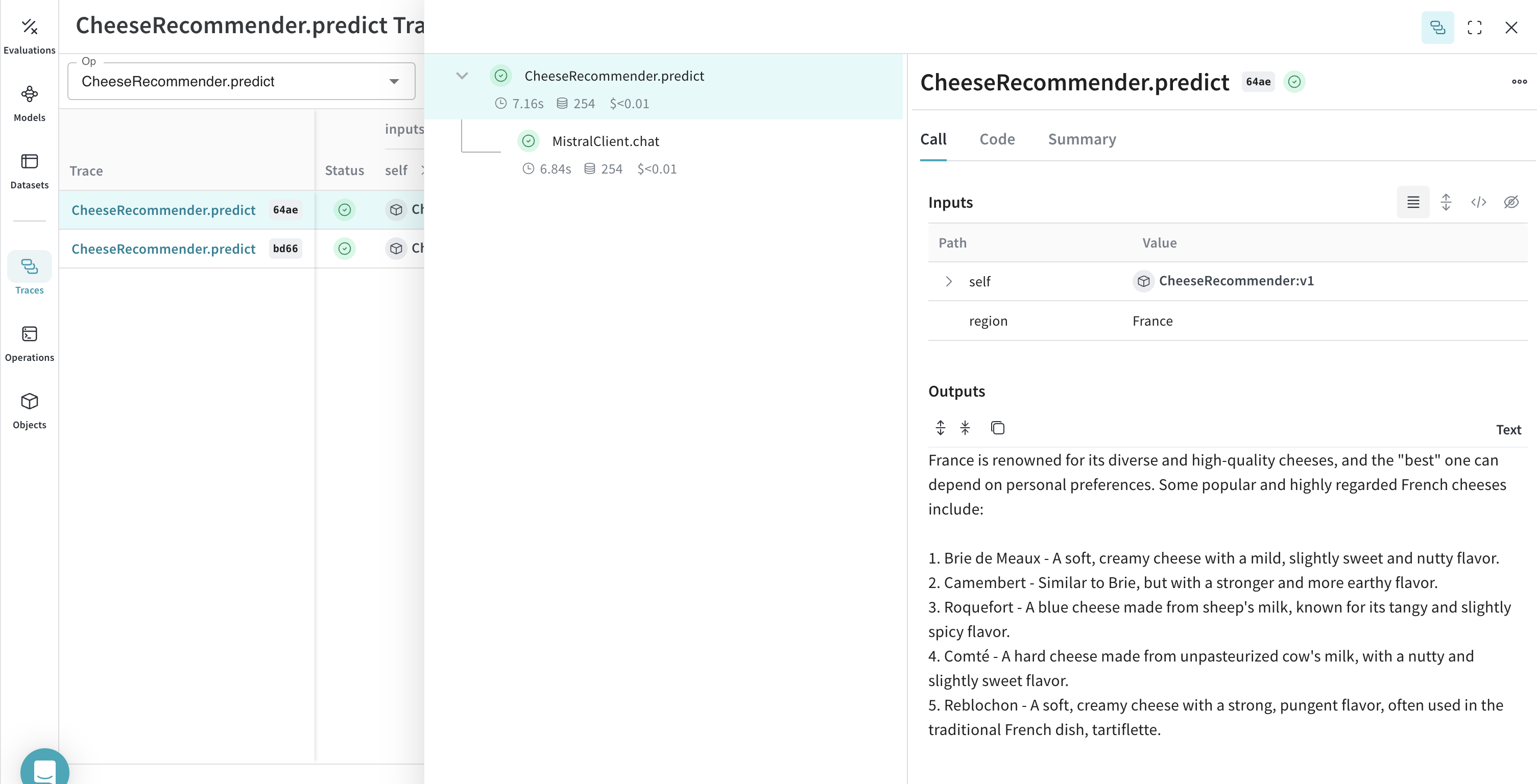
多くの可動パーツがある場合、 実験 を整理するのは困難です。 Model クラスを使用すると、システムプロンプトや使用している モデル など、 アプリケーション の 実験 詳細をキャプチャして整理できます。これにより、 アプリケーション の異なる反復の整理と比較が容易になります。 コード の バージョン管理 や入出力のキャプチャに加えて、 Model は アプリケーション の 振る舞い を制御する構造化された パラメータ をキャプチャするため、どの パラメータ が最適であったかを簡単に見つけることができます。また、 Weave の Models は serveEvaluation と併用することもできます。 以下の例では、 modelcountry を使って 実験 できます。これらを変更するたびに、 CheeseRecommender の新しい バージョン が作成されます。
import weave
from mistralai import Mistral

weave.init("mistralai_project")

class CheeseRecommender(weave.Model): # `weave.Model` に変更
    model: str
    temperature: float

    @weave.op()
    def predict(self, region:str) -> str: # `predict` に変更
        "指定された地域の最高のチーズを推薦する"
        
        client = Mistral(api_key=api_key)

        messages = [
            {
                "role": "user",
                "content": f"What is the best cheese in {region}?",
            },
        ]

        chat_response = client.chat.complete(
            model=model,
            messages=messages,
            temperature=self.temperature
        )
        return chat_response.choices[0].message.content

cheese_model = CheeseRecommender(
    model="mistral-medium-latest",
    temperature=0.0
    )
result = cheese_model.predict(region="France")
print(result)
mistral_model.png