メインコンテンツへスキップ
Weave は、weave.init() を呼び出した後、ChatNVIDIA ライブラリを介して行われた LLM 呼び出しを自動的に追跡し、ログを記録します。
最新のチュートリアルについては、Weights & Biases on NVIDIA をご覧ください。

Tracing

開発中および Production (プロダクション) の両方において、LLM アプリケーションの Traces を中央データベースに保存することは重要です。これらの Traces はデバッグに使用したり、アプリケーションを改善しながら評価するための、トリッキーな例を含んだ Datasets を構築するのに役立ちます。
Weave は ChatNVIDIA python library の Traces を自動的にキャプチャできます。任意のプロジェクト名を指定して weave.init(<project-name>) を呼び出すことで、キャプチャを開始します。
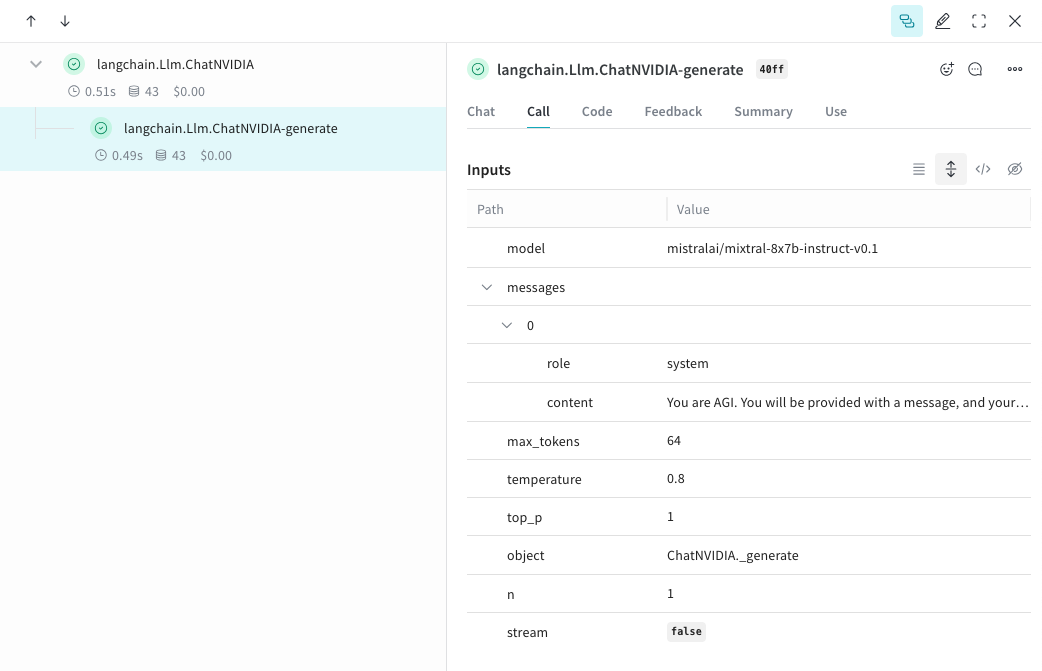
from langchain_nvidia_ai_endpoints import ChatNVIDIA
import weave
client = ChatNVIDIA(model="mistralai/mixtral-8x7b-instruct-v0.1", temperature=0.8, max_tokens=64, top_p=1)
weave.init('emoji-bot')

messages=[
    {
      "role": "system",
      "content": "You are AGI. You will be provided with a message, and your task is to respond using emojis only."
    }]

response = client.invoke(messages)
chatnvidia_trace.png

独自の ops を追跡する

関数を @weave.op でラップすると、入力、出力、およびアプリケーションロジックのキャプチャが開始され、データがアプリ内をどのように流れるかをデバッグできるようになります。ops は深くネストさせることができ、追跡したい関数の ツリー を構築できます。これにより、実験中に git にコミットされていないアドホックな詳細をキャプチャするために、コード の バージョン管理 も自動的に開始されます。単に @weave.op デコレータを付けた関数を作成し、その中で ChatNVIDIA python library を呼び出すだけです。以下の例では、2つの関数を op でラップしています。これにより、RAG アプリにおける検索ステップのような中間ステップが、アプリの 振る舞い にどのように影響しているかを確認できます。
import weave
from langchain_nvidia_ai_endpoints import ChatNVIDIA
import requests, random
PROMPT="""初期のポケモンの図鑑をエミュレートしてください。ポケモンの名前を述べ、その後に説明を加えてください。
        トーンは情報提供でありながら、少し生意気で、事実に基づいた詳細にドライなユーモアを交えてください。3文以内で簡潔に。"""
POKEMON = ['pikachu', 'charmander', 'squirtle', 'bulbasaur', 'jigpuff', 'meowth', 'eevee']
client = ChatNVIDIA(model="mistralai/mixtral-8x7b-instruct-v0.1", temperature=0.7, max_tokens=100, top_p=1)

@weave.op
def get_pokemon_data(pokemon_name):
    # これは RAG アプリ内の検索ステップのような、アプリケーション内のステップです
    url = f"https://pokeapi.co/api/v2/pokemon/{pokemon_name}"
    response = requests.get(url)
    if response.status_code == 200:
        data = response.json()
        name = data["name"]
        types = [t["type"]["name"] for t in data["types"]]
        species_url = data["species"]["url"]
        species_response = requests.get(species_url)
        evolved_from = "Unknown"
        if species_response.status_code == 200:
            species_data = species_response.json()
            if species_data["evolves_from_species"]:
                evolved_from = species_data["evolves_from_species"]["name"]
        return {"name": name, "types": types, "evolved_from": evolved_from}
    else:
        return None

@weave.op
def pokedex(name: str, prompt: str) -> str:
    # これは他の ops を呼び出すルート op です
    data = get_pokemon_data(name)
    if not data: return "Error: Unable to fetch data"

    messages=[
            {"role": "system","content": prompt},
            {"role": "user", "content": str(data)}
        ]

    response = client.invoke(messages)
    return response.content

weave.init('pokedex-nvidia')
# 特定のポケモンのデータを取得する
pokemon_data = pokedex(random.choice(POKEMON), PROMPT)
Weave に移動し、UI で get_pokemon_data をクリックすると、そのステップの入力と出力を確認できます。
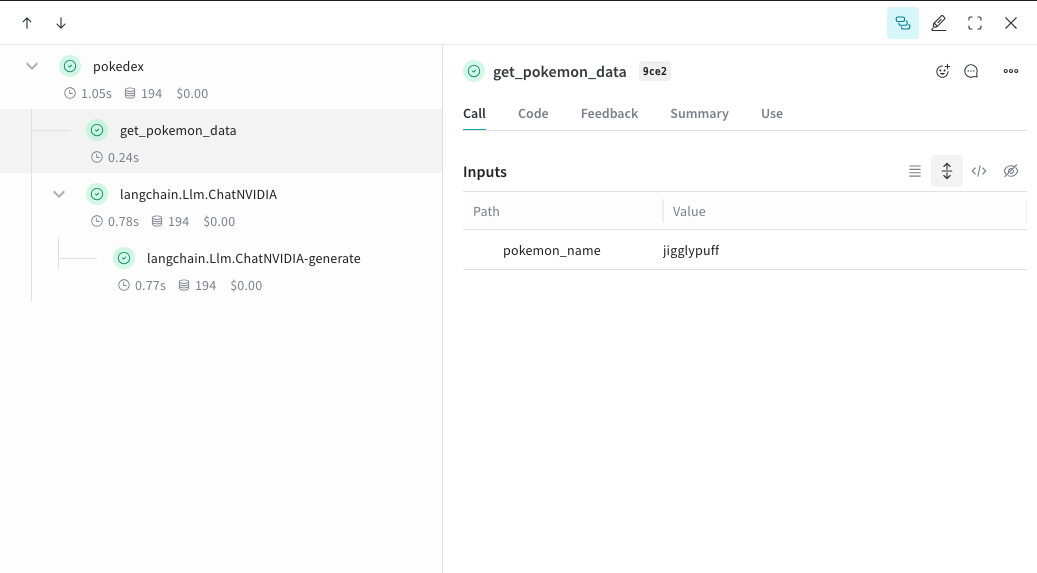
nvidia_pokedex.png

実験を容易にするための Model の作成

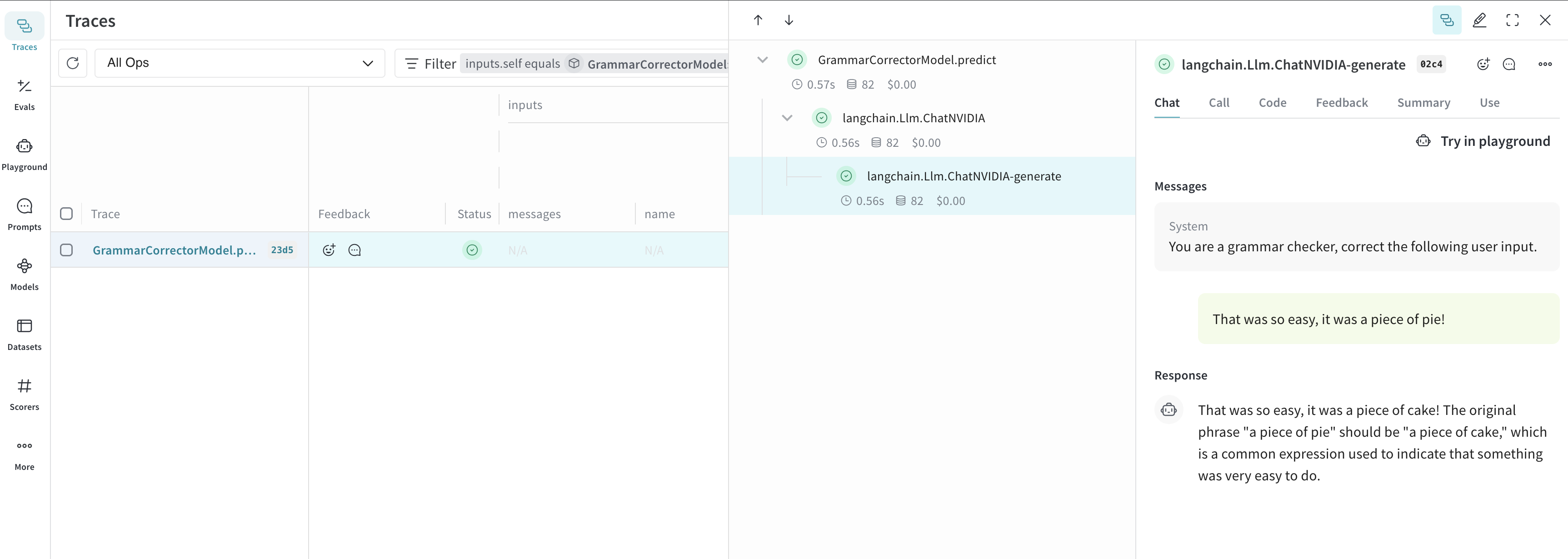
多くの動的な要素がある場合、実験の整理は困難になります。Model クラスを使用することで、システムプロンプトや使用している モデル など、アプリの実験的な詳細をキャプチャして整理できます。これにより、アプリの異なるイテレーションの整理や比較が容易になります。コード の バージョン管理 や入力/出力のキャプチャに加えて、Model はアプリケーションの 振る舞い を制御する構造化された パラメータ をキャプチャするため、どの パラメータ が最適だったかを簡単に見つけることができます。また、Weave Models は serveEvaluations と併用することも可能です。以下の例では、modelsystem_message を使って実験できます。これらいずれかを変更するたびに、GrammarCorrectorModel の新しい バージョン が作成されます。
import weave
from langchain_nvidia_ai_endpoints import ChatNVIDIA

weave.init('grammar-nvidia')

class GrammarCorrectorModel(weave.Model): # weave.Model に変更
  system_message: str

  @weave.op()
  def predict(self, user_input): # predict に変更
    client = ChatNVIDIA(model="mistralai/mixtral-8x7b-instruct-v0.1", temperature=0, max_tokens=100, top_p=1)

    messages=[
          {
              "role": "system",
              "content": self.system_message
          },
          {
              "role": "user",
              "content": user_input
          }
          ]

    response = client.invoke(messages)
    return response.content

corrector = GrammarCorrectorModel(
    system_message = "You are a grammar checker, correct the following user input.")
result = corrector.predict("That was so easy, it was a piece of pie!")
print(result)
chatnvidia_model.png

使用上の情報

ChatNVIDIA インテグレーションは、invokestream、およびそれらの非同期バリアントをサポートしています。また、ツールの使用もサポートしています。 ChatNVIDIA は多種多様な モデル で使用されることを想定しているため、関数呼び出し(function calling)のサポートは含まれていません。